Decoding troubleshooting · Updated October 22, 2026
Base64 to String: Why Valid Base64 Can Fail UTF-8 Decoding
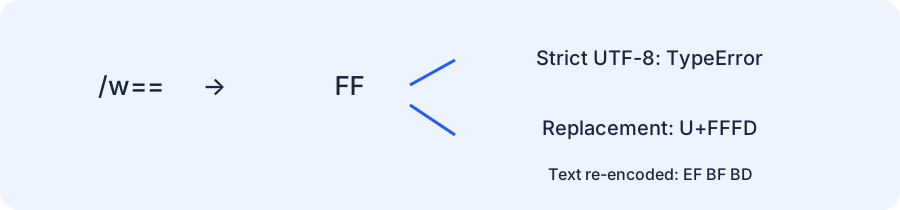
Base64 decoding gives you bytes; those bytes are not necessarily UTF-8 text. /w== correctly decodes to byte FF, but strict UTF-8 decoding throws a TypeError. A permissive decoder displays U+FFFD instead. Keep the original bytes and confirm the expected character encoding before turning a Base64 value into a string.
Reproduce the two-stage failure
The first step succeeds, so changing the Base64 alphabet or adding padding does not repair this fixture. The failure happens only when a second decoder interprets the resulting bytes as text. This example runs in a current browser console or a Node.js environment with the shown Web APIs:
const input = "/w==";
const bytes = Uint8Array.from(atob(input), ch => ch.charCodeAt(0));
console.log(bytes[0]); // 255: Base64 decoded successfully

try {
  const text = new TextDecoder("utf-8", { fatal: true }).decode(bytes);
  console.log(text);
} catch (error) {
  console.log(error.name); // TypeError: bytes are not valid UTF-8
}

const displayed = new TextDecoder("utf-8").decode(bytes);
console.log(displayed.codePointAt(0).toString(16)); // fffd
const changed = new TextEncoder().encode(displayed);
console.log([...changed].map(b => b.toString(16))); // ef bf bd
The exception name is the useful portable check here. The full TypeError message can vary by runtime, so the experiment does not depend on its wording. A Base64 syntax error would happen earlier, while parsing the Base64 representation, rather than inside TextDecoder.
Our byte-preservation matrix
We decoded six fixed Base64 inputs, recorded their exact bytes, tried strict UTF-8, and recorded the code points produced by replacement mode. The last column re-encodes the replacement-mode string as UTF-8 and then Base64. JavaScript generated this table; an independent Python run agreed on the replacement text for every fixture.
| Base64 input | Decoded bytes | Strict UTF-8 result | Replacement-mode code points | Base64 after text round trip |
|---|---|---|---|---|
/w== | ff | TypeError | U+FFFD | 77+9 |
77+9 | efbfbd | � | U+FFFD | 77+9 |
w6k= | c3a9 | é | U+00E9 | w6k= |
6Q== | e9 | TypeError | U+FFFD | 77+9 |
4oI= | e282 | TypeError | U+FFFD | 77+9 |
aGVsbG8= | 68656c6c6f | hello | U+0068 U+0065 U+006C U+006C U+006F | aGVsbG8= |
The first two rows are intentionally different. /w== contains an invalid UTF-8 byte. 77+9 contains the valid UTF-8 representation of the actual replacement character. Both look identical after permissive decoding. Seeing U+FFFD on screen therefore does not prove corruption occurred at this step: that character might genuinely have been present in the original text.
The round-trip column reveals what the screen hides. The first row changes from /w== to 77+9. The second row stays 77+9. Keeping the original byte buffer lets you distinguish the cases. Keeping only the displayed string destroys that evidence.
Check the declared format before choosing a repair
The payload is a file
Do not route image, archive, or other binary bytes through a text decoder merely to save or transfer them. Preserve the byte array and handle it using the expected file format. A text preview is optional and may be meaningless. Base64 is only a transport representation; its presence does not declare a text encoding.
The payload is declared UTF-8 text
Use strict decoding at the boundary and investigate the producer when it fails. A truncated multibyte sequence is one possible cause, as the 4oI= fixture demonstrates. It is not the only cause. Do not infer a network fault, a server bug, or the intended original character from a replacement marker alone.
The payload uses another declared character encoding
Choose the codec specified by the producing system. The fixture 6Q== contains byte E9; UTF-8 rejects it on its own, while another encoding could give it a meaning. That observation is not enough to guess which encoding the producer intended. Check the field contract, source file metadata, or a known fixture instead of switching codecs until the preview looks plausible.
A regression check for accidental string conversion
const raw = Uint8Array.of(255);
const lossy = new TextDecoder().decode(raw);
const restored = new TextEncoder().encode(lossy);
console.assert(raw[0] === 255);
console.assert(restored.length === 3);
console.assert(restored[0] === 239); // FF became EF BF BD
This small test catches a pipeline that decodes arbitrary bytes as text and later writes them out again. For actual UTF-8 content, test a strict decode and a suitable expected-text fixture. Do not use universal byte equality as a shortcut for every decoder setting: processing a byte-order mark or applying an intentional normalization policy can introduce separate behavior that should be tested explicitly.
Inspect the value with the right tool
Our Base64 decoder already uses strict UTF-8 mode and reports invalid text rather than silently replacing it. This page explains the failure behind that warning; it is not another generic Base64 converter. To inspect the bytes directly, use the hex byte lab. If the Base64 value is inside a query parameter, use the URL decoder to handle that transport layer separately, then apply Base64 and text decoding in the correct order.
API reference: TextDecoder fatal error mode. The six-fixture matrix, byte round-trip tests, and failure analysis are original experiments for this page.