URL encoding lab · Updated October 18, 2026
Base 32 Encoder: Keep Padding Separate from URL Encoding
Encode your text as UTF-8 bytes, then Base32; when adding the result to a URL, encode it as one parameter value. For example, foo becomes MZXW6===, and the query is token=MZXW6%3D%3D%3D. Keep padding unless your receiving protocol explicitly permits omitting it.
Have an encoded value already? Use the Base32 decoder to recover text or bytes.
Try the local Base32 and URL lab
This converter processes input in your browser without uploading it. Optional site analytics loads only with your consent; do not paste authentication secrets into an online tool.
One input, three different representations
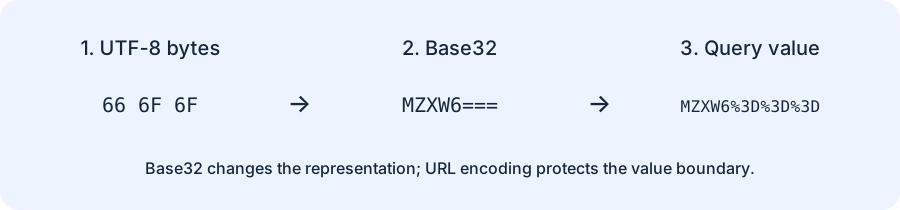
Start with the three bytes 66 6F 6F. Their text interpretation is foo. Base32 represents the same bytes using five-bit symbols, producing MZXW6===. Percent-encoding is a separate operation: it prepares that string for a URL component, escaping each equals sign as %3D. It does not turn the Base32 text back into the original bytes.
Our fixed-input experiment: where the equals signs appear
The table below was generated from fixed byte inputs with Python's standard-library Base32 encoder and independently checked against the JavaScript encoder used above. Hex identifies the exact input bytes; it is not the text you should type into the text field. The final column applies component encoding to the Base32 output. These are reproducible local tests, not observations about third-party servers.
| Input bytes (hex) | Padded Base32 | Padding count | URL component |
|---|---|---|---|
66 | MY====== | 6 | MY%3D%3D%3D%3D%3D%3D |
666f | MZXQ==== | 4 | MZXQ%3D%3D%3D%3D |
666f6f | MZXW6=== | 3 | MZXW6%3D%3D%3D |
666f6f62 | MZXW6YQ= | 1 | MZXW6YQ%3D |
666f6f6261 | MZXW6YTB | 0 | MZXW6YTB |
666f6f626172 | MZXW6YTBOI====== | 6 | MZXW6YTBOI%3D%3D%3D%3D%3D%3D |
e4b8ad | 4S4K2=== | 3 | 4S4K2%3D%3D%3D |
The length boundary is the useful result: one input byte needs six padding characters; two need four; three need three; four need one; five need none. The pattern restarts with the next five-byte block. An empty input produces an empty output. Five ASCII characters occupy five bytes, but five non-ASCII characters can occupy more, so count bytes rather than visible characters.
What changes when you turn padding off?
For foo, the unpadded string is MZXW6. In this lab, its encoded component remains MZXW6, because those letters and digits are unreserved. Padded output is eight characters; its encoded component is fourteen characters because three equals signs each expand to three characters. That difference describes transport length, not stronger or weaker encryption.
Removing padding is an explicit compatibility choice. A receiver expecting padded RFC 4648 Base32 may reject the shorter form. A different protocol may require the unpadded form. Ask what that protocol accepts before changing the switch; do not silently strip characters to make a link look cleaner.
Build the query once, then parse once
const base32Text = "MZXW6===";
const url = new URL("https://example.test/check");
url.searchParams.set("token", base32Text);
console.log(url.search); // ?token=MZXW6%3D%3D%3D
console.log(url.searchParams.get("token")); // MZXW6===
Pass raw Base32 text to the query builder. If you first turn it into MZXW6%3D%3D%3D and then pass that string to the builder, each percent sign is encoded again. The query contains %253D, and parsing it once returns literal percent escapes instead of the Base32 string you intended. Our test checks both paths so this failure is easy to reproduce.
A query parser can often preserve literal equals signs inside a value, but explicitly serializing the value avoids depending on ad hoc splitting. Do not split a query field on every equals sign and assume the second piece is the complete value. Use the parser supplied by your environment.
Reproduce the matrix in Python
import base64
from urllib.parse import urlencode, parse_qs

raw = "foo".encode("utf-8")
encoded = base64.b32encode(raw).decode("ascii")
query = urlencode({"token": encoded})
assert query == "token=MZXW6%3D%3D%3D"
assert parse_qs(query)["token"][0] == encoded
assert base64.b32decode(encoded) == raw
print(encoded, query)
Replace the input with your own non-secret test string. To reproduce a table row, replace raw with bytes.fromhex("666f6f"). Our checks also cover all 256 possible byte values together, lengths from zero through 128 bytes, UTF-8 text, and URL-parameter round trips. A decoder is deliberately outside this tool's scope: encoding bytes and guessing what malformed input means are different jobs.
Questions to settle before using the output
Is this Base32hex or Crockford Base32?
No. This tool uses the RFC 4648 Base32 alphabet A–Z and 2–7. Base32hex uses a different alphabet, and Crockford Base32 has its own conventions. Similar names do not make the resulting strings interchangeable.
Does Base32 hide a token?
No. Anyone who can read a Base32 string can decode it. URL encoding also does not encrypt it. Keep secrets out of URLs when logs, browser history, or shared links could expose them.
Which tool should I use next?
If you already have Base32 text and only need URL escaping, use the URL encoder. If your input is an actual hex byte dump, use the hex-to-URL byte lab. For the related six-bit format, see our Base64 tool.
Reference: RFC 4648, Base32. The matrix, converter, transport-length comparison, and failure-path tests are original work for this page.