Encoding troubleshooting · Updated October 21, 2026
ASCII Encoder UnicodeEncodeError: Why Ignore and Replace Lose Data
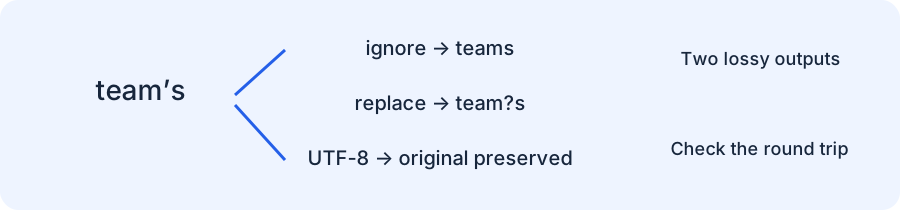
If an ASCII encoder rejects a smart apostrophe, do not silence the error unless losing that character is intentional. Python rejects team’s because U+2019 is outside ASCII. errors="ignore" changes it to teams; errors="replace" changes it to team?s. If the destination supports UTF-8, encode with UTF-8 and preserve the original text.
Start with the exact failing character
text = "team\u2019s"
text.encode("ascii")
# UnicodeEncodeError: 'ascii' codec can't encode character '\u2019'
# in position 4: ordinal not in range(128)
This is a text-to-bytes encoding failure. The input already is a Python string. It is not a request to decode unknown bytes, and calling decode on an unrelated byte sequence does not repair this boundary. Inspect the code point at the reported position before changing the codec or error policy.
ASCII accepts values from 0 through 127. The apostrophe in the example looks similar to the ordinary ASCII apostrophe, but it is a different character. A pasted non-breaking space can create the same class of failure while appearing almost identical to an ordinary space.
Our fixed-input policy comparison
We ran the same inputs through three Python ASCII error policies and UTF-8. The escaped column shows literal backslash sequences, not the original Unicode characters. The UTF-8 column gives exact bytes in hexadecimal. Non-ASCII samples all fail strict ASCII encoding; the two ASCII control samples succeed.
| Input | ASCII replace | ASCII ignore | ASCII backslashreplace | UTF-8 hex |
|---|---|---|---|---|
team’s | team?s | teams | team\u2019s | 7465616de2809973 |
café | caf? | caf | caf\xe9 | 636166c3a9 |
A B | A?B | AB | A\xa0B | 41c2a042 |
中 | ? | | \u4e2d | e4b8ad |
🙂 | ? | | \U0001f642 | f09f9982 |
team?s | team?s | team?s | team?s | 7465616d3f73 |
teams | teams | teams | teams | 7465616d73 |
The important result is a collision. The smart-apostrophe input and the literal input teams both become teams under ignore. Likewise, team’s and the literal input team?s both become team?s under replace. Once these outputs are stored alone, the discarded distinction cannot be reconstructed from the bytes.
The non-breaking-space row demonstrates another collision: A B becomes AB when ignored. That changes a separator into no separator at all. Whether the input is a search term, an identifier, or a display label, test the meaning of the result rather than checking only that encoding stopped raising exceptions.
Reproduce the matrix
samples = ["team\u2019s", "café", "A\u00a0B", "中", "🙂", "team?s", "teams"]
for text in samples:
    try:
        strict = text.encode("ascii").hex()
    except UnicodeEncodeError as error:
        strict = str(error)
    print(repr(text), strict)
    for policy in ("replace", "ignore", "backslashreplace"):
        print(policy, repr(text.encode("ascii", errors=policy)))
    raw = text.encode("utf-8")
    assert raw.decode("utf-8") == text
    print("utf8 hex", raw.hex())

assert "team\u2019s".encode("ascii", "ignore") == b"teams"
assert "team\u2019s".encode("ascii", "replace") == b"team?s"
These fixtures were generated locally, not copied from a third-party tool. We additionally checked every single ASCII code point from 0 through 127 and six representative non-ASCII rejection cases. That establishes the tested boundary; it does not claim to validate every external file format or receiving API.
Choose the repair from the receiving contract
The receiver supports UTF-8
Use text.encode("utf-8") and ensure the receiving system interprets those bytes as UTF-8. In our first fixture the apostrophe becomes bytes E2 80 99. Converting those bytes back with the same codec reproduces the original string, as the assertion in the example checks. Merely relabeling bytes as ASCII would not make them ASCII.
The receiver really requires ASCII
Validate the input and report the unsupported character, or define an explicit application-specific transformation. For example, replacing one known typographic apostrophe with an ASCII apostrophe may be a deliberate product choice for a display field. It is not a universal conversion rule for names, passwords, identifiers, or signed data. Document the transformation and keep a test showing the before and after values.
You only need an escaped diagnostic
Backslash replacement can make a diagnostic printable, but the result is a new ASCII string containing a backslash and digits. A receiver will not automatically interpret \u2019 as a smart apostrophe unless its format specifies that escape syntax. Treat such output as a representation for inspection, not a drop-in substitute for the original value.
Do not confuse ASCII conversion with URL encoding
A URL can carry an ASCII percent-encoded representation of UTF-8 bytes. That does not mean the original text was converted into ASCII characters with ignore or replace. For our sample, UTF-8 component encoding preserves the apostrophe as team%E2%80%99s. Dropping it first produces teams, and no later URL escaping can restore it.
Use the URL encoder to inspect the component representation. For exact raw-byte input, use the hex-to-URL byte lab. The Base64 tool offers a separate byte representation; choosing Base64 does not excuse deleting unsupported characters before the encoding step.
A small regression test that catches the bug
Keep both the smart-apostrophe string and its plain-letter collision in your test fixtures. Require a UTF-8 round trip where Unicode is supported, or require a clear validation failure where ASCII is mandatory. Avoid a test whose only assertion is that no exception occurred: both lossy policies would pass that test while corrupting the value.
Reference: Python codec error handlers. The fixed-input matrix, collision analysis, and runnable tests above are original experiments.